Tutorial
This tutorial gives a quick tour of the features of fmusim.
Tip
To follow along you can download the latest release of the Reference FMUs. It contains a set of FMUs with source code and binaries for all common platforms.
Get information about an FMU
$ fmusim info BouncingBall.fmu

Model Information

FMI Version:       3.0
Interface Types:   Model Exchange, Co-Simulation
Model Name:        BouncingBall
Platforms:         c-code, aarch64-darwin, aarch64-linux, x86-windows, x86_64-darwin, x86_64-linux, x86_64-windows
Continuous States: 2
Event Indicators:  1
Model Variables:   8
Generation Date:   2026-07-10T09:46:15.950713+00:00
Generation Tool:   Reference FMUs (v0.0.40)
Description:       This model calculates the trajectory, over time, of a ball dropped from a height of 1 m

Model Variables

Name   | Description
-------+----------------------------------------------
time   | Simulation time
h      | Position of the ball
der(h) | Derivative of h
v      | Velocity of the ball
der(v) | Derivative of v
g      | Gravity acting on the ball
e      | Coefficient of restitution
v_min  | Velocity below which the ball stops bouncing
List the contents of an FMU
$ fmusim list BoucingBall.fmu
binaries/
documentation/
sources/
modelDescription.xml
binaries/aarch64-darwin/
binaries/aarch64-linux/
binaries/x86-windows/
binaries/x86_64-darwin/
binaries/x86_64-linux/
binaries/x86_64-windows/
binaries/aarch64-linux/BouncingBall.so
binaries/x86_64-darwin/BouncingBall.dylib
binaries/aarch64-darwin/BouncingBall.dylib
binaries/x86-windows/BouncingBall.dll
binaries/x86_64-linux/BouncingBall.so
binaries/x86_64-windows/BouncingBall.dll
documentation/result.svg
documentation/index.html
sources/cosimulation.c
sources/config.h
sources/buildDescription.xml
sources/model.h
sources/cosimulation.h
sources/fmi3Functions.c
sources/model.c
Simulate an FMU
Plot the output
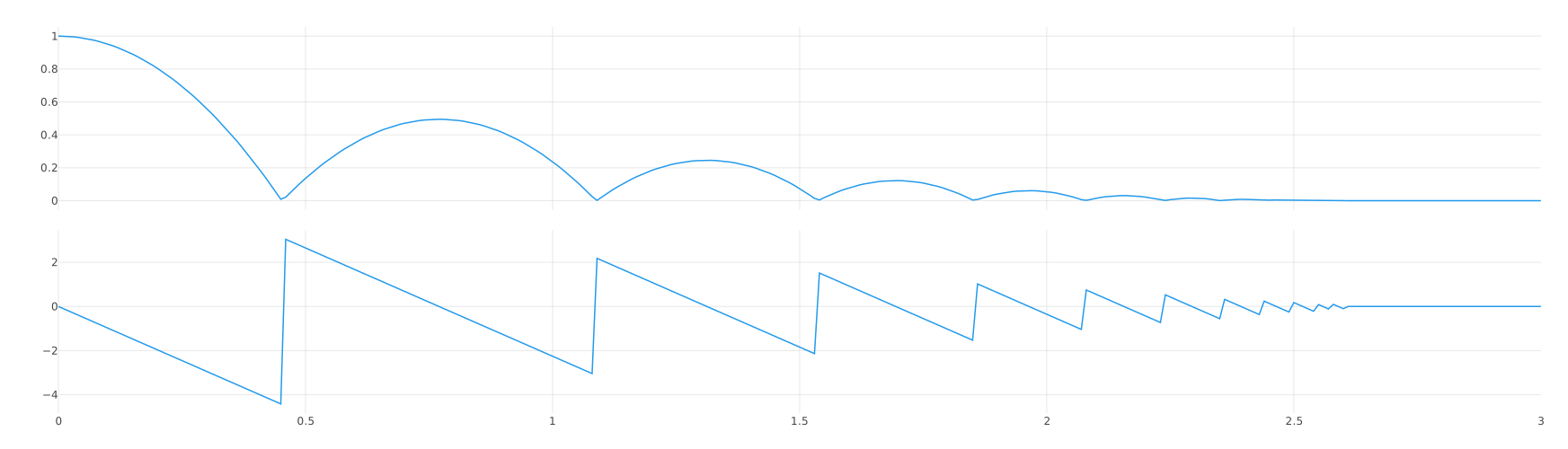
$ fmusim simulate BouncingBall.fmu --show-plot
This will open the plot in a new browser window.
Write the output to a CSV file
$ fmusim simulate BouncingBall.fmu --output-file BouncingBall_out.csv
This will write the output to BouncingBall_out.csv.
time,h,v
0,1,0
0.01,0.99955855,-0.0981
0.02,0.9981361000000002,-0.1962000000000001
0.03,0.9957326500000004,-0.2943000000000001
0.04,0.9923482000000008,-0.39239999999999997
...
Tip
Output files can be used as input files using the --input-file option.
Set start values
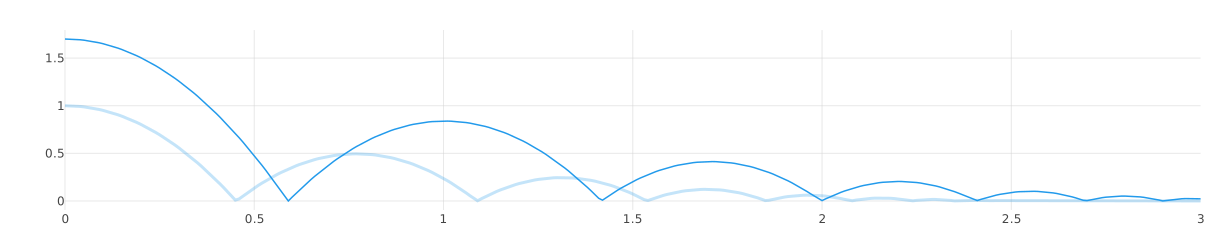
We can now set a start value of 1.7 for the variable h, set it as our only output variable, and use the previous output as a reference.
$ fmusim simulate BouncingBall.fmu --start-value h=1.7 --output-variable h --reference-file BouncingBall_out.csv
Tip
The --start-value and --output-variable options can be use multiple times.
Set simulation parameters
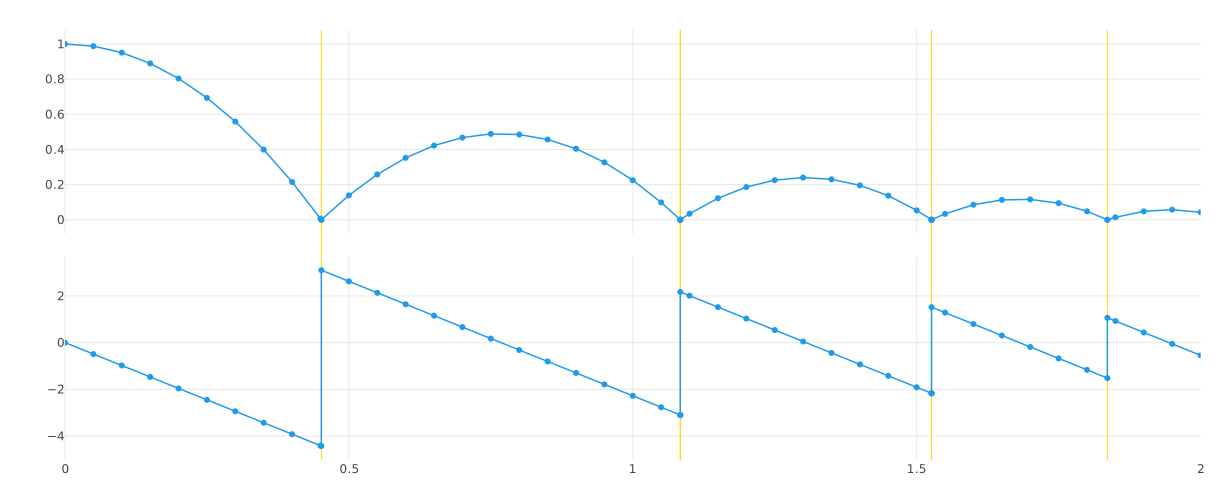
Let's use Model Exchange, change some simulation parameters, and log the FMI calls.
$ fmusim simulate BouncingBall.fmu --stop-time 2 --output-interval 0.02 --interface-type me --log-fmi-calls --show-plot
[FMI] fmi3InstantiateModelExchange(instanceName="BouncingBall", instantiationToken="{1AE5E10D-9521-4DE3-80B9-D0EAAA7D5AF1}", resourcePath=None, visible=false, loggingOn=false)
[FMI] fmi3EnterInitializationMode(tolerance=None, startTime=0.0, stopTime=None) -> fmi3OK
[FMI] fmi3ExitInitializationMode() -> fmi3OK
[FMI] fmi3UpdateDiscreteStates(discreteStatesNeedUpdate=false, terminateSimulation=false, nominalsOfContinuousStatesChanged=false, valuesOfContinuousStatesChanged=false, nextEventTime=None) -> fmi3OK
[FMI] fmi3EnterContinuousTimeMode() -> fmi3OK
[FMI] fmi3GetNumberOfContinuousStates(nContinuousStates=2) -> fmi3OK
[FMI] fmi3GetNumberOfEventIndicators(nEventIndicators=1) -> fmi3OK
[FMI] fmi3GetContinuousStates(continuousStates=[1.0, 0.0]) -> fmi3OK
[FMI] fmi3GetNominalsOfContinuousStates(nominals=[1.0, 1.0]) -> fmi3OK
[FMI] fmi3GetFloat64(valueReferences=[1], values=[1.0]) -> fmi3OK
[FMI] fmi3GetFloat64(valueReferences=[3], values=[0.0]) -> fmi3OK
[FMI] fmi3SetTime(time=0.0) -> fmi3OK
[FMI] fmi3SetContinuousStates(continuousStates=[1.0, 0.0]) -> fmi3OK
[FMI] fmi3GetContinuousStateDerivatives(derivatives=[0.0, -9.81]) -> fmi3OK
[FMI] fmi3SetTime(time=6.728226557161375e-11) -> fmi3OK
[FMI] fmi3SetContinuousStates(continuousStates=[1.0, -6.600390252575309e-10]) -> fmi3OK
[FMI] fmi3GetContinuousStateDerivatives(derivatives=[-6.600390252575309e-10, -9.81]) -> fmi3OK
...
[FMI] fmi3Termiate() -> fmi3OK
Tip
Run fmusim simulate --help to get a full list of all available options.
Generate a simulation configuration
You can let fmusim create a configuration file with default parameters for the simulation.
$ fmusim generate-config BouncingBall.fmu --config-file BouncingBall_config.toml
This creates a configuration file with default start values defined by the model that can be uncommented.
The generated file can then be used directly:
$ fmusim simulate-config BouncingBall_config.toml
Tip
Paths in the generated config are relative to the config file, so the FMU can be moved with the config without changing the TOML file.
Validate an FMU
$ fmusim validate BouncingBall.fmu
    Validating ZIP archive
    Validating model description
    Validating build description
Build the platform binary
Building the platform binary for a source code FMU requires CMake and a supported compiler to be installed.
$ fmusim build BouncingBall.fmu
Creating CMake project
Configuring CMake project
...
Building CMake project
...
Finished
Tip
Run fmusim list <FMU_FILE> to see which platform binaries are contained in an FMU.
Getting help
Help menus
The --help flag can be used to view the help menu for a command, e.g., for fmusim:
$ fmusim help
To view the help menu for a specific sub command, e.g., for fmusim simulate:
$ fmusim help simulate
Viewing the version
When seeking help, it's important to determine the version of fmusim that you're using — sometimes the problem is already solved in a newer version.
To check the installed version:
$ fmusim --version